14 Level Unlocked Gaming Designs: What’s Inside and How to Make Them Your Own
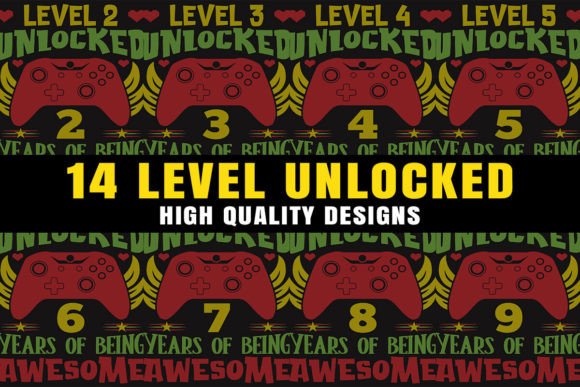
When you want to turn a simple game reference into something wearable, displayable, or giftable, having the right starting files removes a ton of guesswork. The 14 Level Unlocked Gaming Designs pack is a collection of 14 gaming-inspired graphics built for people who want to craft, sell, or personalize items without needing to illustrate everything from scratch. Instead of vague descriptions or low-quality JPEGs, you get three practical file formats designed for different stages of a project — from quick previews to precision editing and final printing.
What You Actually Get in the Design Pack
Each design comes in three variations, which makes the set flexible enough for a wide range of uses. First, there are 14 high-resolution PNG files at 300 ppi with transparent backgrounds. That means you can drop them onto any shirt color, tote material, or digital canvas without a white box ruining the composition. Transparency is especially helpful if you’re working with dark fabrics, colorful backdrops, or layered compositions. The 300 ppi resolution keeps edges crisp when printed at typical merch sizes — from a chest graphic on a tee to a full-bleed phone case insert.
Next, the pack includes 14 vector EPS files that you can open and edit in Adobe Illustrator or compatible vector software. Unlike raster images, vectors don’t lose quality when you scale them. That’s a big deal if you want to blow up a design for a wall decal, resize elements for a mug wrap, or tweak colors to match brand guidelines without sacrificing sharpness. Finally, you get 14 JPG preview files. These aren’t intended for production, but they let you quickly skim the designs, share rough mockups with team members or clients, and select which graphic to work on first without needing to open larger files.
It’s worth noting right away that mockup files are not included. You won’t get pre-staged product photos showing the designs on apparel or home decor. For many crafters and small business owners, this isn’t a dealbreaker — you can create your own mockups using free tools or your own photos. But it’s something to plan for if you rely heavily on ready-made presentation visuals.
Where These Gaming Designs Fit into Real Life
People don’t download design files just to admire them in a folder. They download them because they have a specific project in mind — or several. The Level Unlocked theme has a retro-gaming appeal that resonates with streamers, nostalgic gamers, hobbyist crafters, and anyone who enjoys playful, pixel-inspired or achievement-style iconography. Here are some concrete ways those 14 designs move from digital asset to finished product.
Custom Apparel That Starts a Conversation
A local gaming tournament organizer can use the PNG files to create staff shirts or participant giveaways. Because the designs sit on transparent backgrounds, they look clean on cotton, polyester blends, or athletic tees. If you’re using a print-on-demand service like Printful or a home vinyl cutter, the high resolution prevents that fuzzy, blown-out look many low-quality graphics develop. Even a single design turned into a sweatshirt or hoodie becomes an instant connection point at events — people recognize the “level unlocked” vibe and start talking.
Personalized Accessories for Daily Use
Think beyond clothing. One of the simplest weekend projects is creating a quirky tote bag. You can take a PNG, arrange it with a name or inside joke, and press it onto a blank canvas tote. The same logic applies to making a vibrant mug: if you have sublimation equipment, the PNG file with transparent background lets you design full wraps without awkward borders. A dad who wants to surprise his teenager with a gaming-themed morning mug doesn’t need a design degree — just the right file and a heat press. Phone cases are another low-effort, high-impact item. A clear case with a carefully trimmed insert transforms a generic phone into something that reflects personality without permanent alteration.
Wall Art That Brings Personality to a Room
Many people don’t realize how easily a digital graphic becomes unique wall art. With the EPS vectors, you can scale a design up to poster size without pixelation. A college student decorating a dorm room can print a few on heavy cardstock, frame them, and create a cohesive gallery wall. A gaming YouTuber or streamer can use the vector files to produce backdrop posters that reinforce their channel’s branding. Because the designs are editable, you can recolor them to match a room’s palette — something you can’t do easily with flat, uneditable JPGs.
How Different People Put These Graphics to Work
The value of a design set isn’t just about file specs; it’s about who can use it and what they get done. A stay-at-home parent running a small Etsy shop might use the 14 Level Unlocked Gaming Designs to quickly add a new collection of enamel pin mockups, sticker sheets, or iron-on patches to their store. They don’t have to commission an artist for each idea. They can take the EPS file, change the color scheme to match seasonal trends, and have a new listing ready by lunchtime.
A marketer for a local gaming café or esports club can use the PNGs on social media graphics — overlaying the transparent design onto photos of the venue, upcoming event posters, or loyalty punch cards. The preview JPGs become useful for internal approval: they can email quick options without sending hefty design files back and forth.
Educators who run after-school coding or game design clubs often look for visual ways to celebrate progress. Printing certificates with a “level unlocked” graphic, creating vinyl stickers for laptops, or making badges for completed modules gives kids a tangible reward. The transparent PNG files make it simple to layer the artwork on top of certificate borders without awkward cropping.
Freelance designers who offer game-themed branding packages can use these elements to complement custom client work. Rather than reinventing the wheel, they can incorporate the vector designs into larger compositions, modify paths, or use parts of the graphics to build a cohesive visual identity for a gaming podcast or Twitch channel overlay.
What to Consider Before You Download and Use
Before you buy or download, there are a few practical points that affect how smoothly your project goes. First, software compatibility: the EPS files are designed for Adobe Illustrator, but other vector programs like CorelDRAW, Affinity Designer, or free tools like Inkscape can also open them with occasional slight adjustments. The PNGs are universally usable. If you don’t own any vector software, you can still get excellent print results from the PNGs alone — you just lose the ability to infinitely scale or edit individual vector paths.
Second, think about licensing. Many design packs come with specific terms about commercial use, print-on-demand, and resale as-is. Not all sellers allow the files to be used on products you sell, so check the accompanying license. Even when commercial use is granted, you typically cannot resell the files themselves or claim the design as your original artwork. This is standard, but it’s easy to overlook when you’re excited about launching a new product line.
Third, the absence of mockup files means you’ll need to create your own product presentations if you’re selling online. This isn’t difficult — plenty of free mockup generators let you upload a PNG and see it on a shirt or mug instantly. But it’s an extra step to budget time for, especially if you’re listing items on multiple marketplaces.
Finally, print method matters. The 300 ppi PNGs are ideal for direct-to-garment printing, sublimation on polyester-coated items, or use with cutting machines like Cricut and Silhouette. If you’re screen printing, you may need to do additional color separations, and the EPS vectors give you more control over that process. Know your production method before you commit to a large run of merchandise.
Getting the Most Out of Each File Type
Instead of treating all three file formats equally, match each one to a specific task. Use the EPS vector files when you need to resize drastically, rework elements, or prepare artwork for a professional printer that requests vector formats. Open the PNG files when you’re ready to do a quick test print, apply a design to a mockup, or run a home craft project without extra conversion steps. Keep the JPG previews in a separate folder for easy browsing, client approvals, or as reference images when you’re organizing what you’ve created.
If you’re making a shirt, start with the PNG on a mockup to check placement and scale. Then, if adjustments are needed, go back to the EPS. If you’re crafting a phone case, the PNG might be all you need — trim it to size, insert, and done. This workflow saves time and prevents frustration.
The 14 designs themselves offer a cohesive set, so you can mix and match across a product line: maybe the same “Level Unlocked” badge goes on a mug, a tote, and a framed art print in a gamer’s home office. The common theme ties items together without making them look repetitive, especially if you vary the color or composition slightly using the vector files.
Whether you’re a maker experimenting with your first heat press, a seasoned Etsy seller refreshing seasonal inventory, or a parent crafting a memorable birthday gift, having the right file foundation transforms a vague idea into something real in a few steps. The 14 Level Unlocked Gaming Designs supply that foundation — just add your own creativity, production method, and a clear plan for how each piece will live beyond the screen.